Automated customer service simulates human replies and requires you to refine the rules and content yourself. The higher the level of refinement, the higher the reply rate.
It is recommended that customer service staff regularly collect frequently asked questions from buyers and categorize them.
Adding these to the auto-reply rules can effectively increase the reply rate.
This feature requires the XM plugin and platform API interfaces. When setting up rules, you must be logged into your store in the Seller Center.
When the function is running, your computer can be turned off, as it runs automatically in the background on the XM server.
I. Chat Content Rule Settings
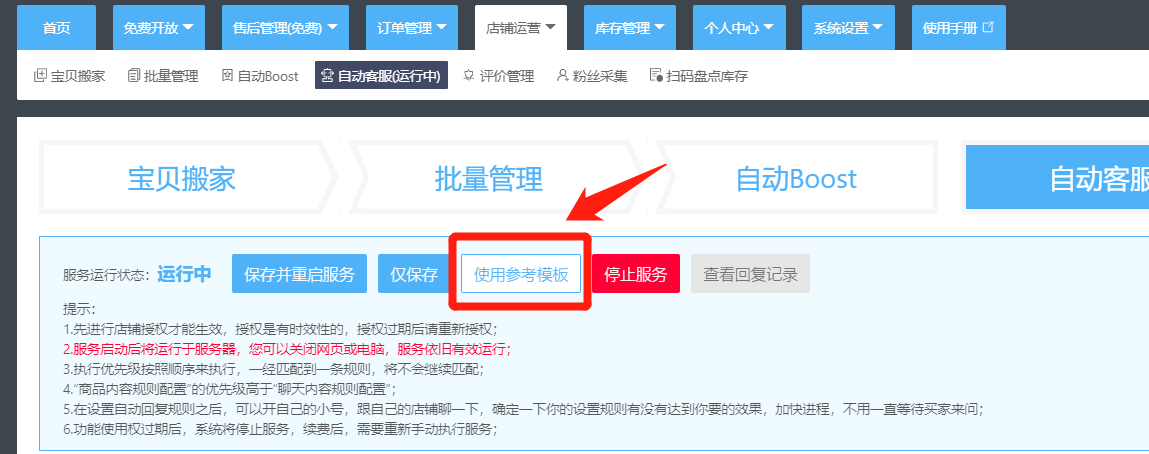
- For first-time use, please start with the Reference Template to understand how to set up auto-reply rules. The template is for reference only. To truly improve the reply rate, please refine the reply rules yourself. The higher the level of refinement, the higher the reply rate.
)
-
There are 4 rule matching modes:
-
Any Content: Reply regardless of what the customer sends.
-
Exact Match: The content sent by the buyer must exactly match one of the items in the [Match Content].
-
Fuzzy Match, Any Condition: The content sent by the buyer must [contain] one of the items in the [Match Content]. (Recommended)
-
Fuzzy Match, All Conditions Met: The content sent by the buyer must [contain] all items in the [Match Content]. (Recommended)
)
- Items that can be configured in chat rules include: Matching Mode (Required)
Match Content (Required)
Reply Content (Required)
Image Reply (Optional)
Reply Frequency (Optional)
Date Restriction (Optional)
Day of Week Restriction (Optional)
Time Restriction (Optional)
II. Product Content Rule Settings
The difference between product content rules and chat content rules is:
Chat content rules trigger auto-replies based on matching the buyer's chat content.
Product content rules trigger auto-replies based on matching the product information in the buyer's chat window.
For example: If a buyer enters the consultation via a specific product detail page, a link to that product will appear in the chat window.
At this point, the auto-reply for the product we have set up will be triggered.
Especially for products with special sizes or those requiring specific explanations, this rule can be used to provide prompts to buyers.
)
Comments
0 commentsNo comments yet — be the first to speak
If this piece sparked a thought, leave a comment and share your take.